

Art Gallery Simulator System Requirements
Art Gallery Simulator system requirements 2025 - can your PC run Art Gallery Simulator?
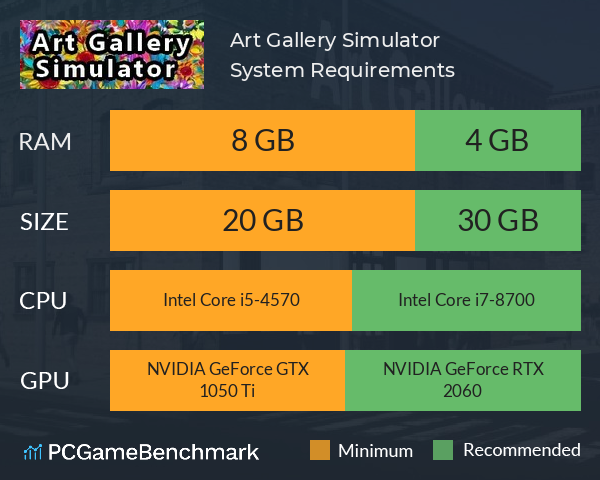
| Minimum | Recommended | |
| CPU | Intel Core i5-4570 | Intel Core i7-8700 |
| Graphics Card | NVIDIA GeForce GTX 1050 Ti | NVIDIA GeForce RTX 2060 |
| RAM | 8 GB | 4 GB |
| File Size | 20 GB | 30 GB |
| OS | Unknown | Windows 10 and above |
Can you run it? Test your computer against Art Gallery Simulator system requirements.
Can I Run Art Gallery Simulator?
To play Art Gallery Simulator you will need a minimum CPU equivalent to an Intel Core i5-4570. Whereas, an Intel Core i7-8700 is recommended in order to run it. Provided that you have at least an NVIDIA GeForce GTX 1050 Ti graphics card you can play the game. But, according to the developers the recommended graphics card is an NVIDIA GeForce RTX 2060. In terms of game file size, you will need at least 20 GB of free disk space available. Make sure your have 30 GB of free disk space in order to install Art Gallery Simulator. The minimum memory requirement for Art Gallery Simulator is 8 GB of RAM installed in your computer. Additionally, the game developers recommend somewhere around 4 GB of RAM in your system.
Art Gallery Simulator will run on PC system with and upwards.
Looking for an upgrade? See our graphics card comparison and CPU compare for benchmarks. We'll help you find the best deal for the right gear to run the game.
Art Gallery Simulator FPS - what frame rate can you expect?
How many FPS will I get on Art Gallery Simulator? An FPS monitor is the first step in understanding whether your gaming PC will be up to the challenge of running the most hotly anticipated games.
Download our free tool on Overwolf to start tracking your gaming PC’s performance ahead of the launch of Art Gallery Simulator. Thanks to its live frame rate monitoring and detailed post-game insights, our FPS Monitor app is the perfect way to benchmark your PC while you get ready for the Art Gallery Simulator release date.
Once Art Gallery Simulator is out, check back here to see how Art Gallery Simulator performs on a variety of real-world PC gaming setups.
Art Gallery Simulator Details
| Download | Via Steam |
| Categories | Casual Indie Simulation |
| Art Gallery Simulator Release Date | Estimated 29th of Dec 2028 |
Enjoy a side of art with a serving of business building! Go rags to riches! Start by fixing up an art gallery in the slums and work your way up in the world. Sell thousands of unique pieces of art and eventually open up your very own art museum in the high class downtown commercial district!