

Assassin's Creed Shadows requirements for PC
Assassin's Creed Shadows system requirements for Windows 10 PCs and laptops, with AC Shadows benchmark test and minimum and specs.
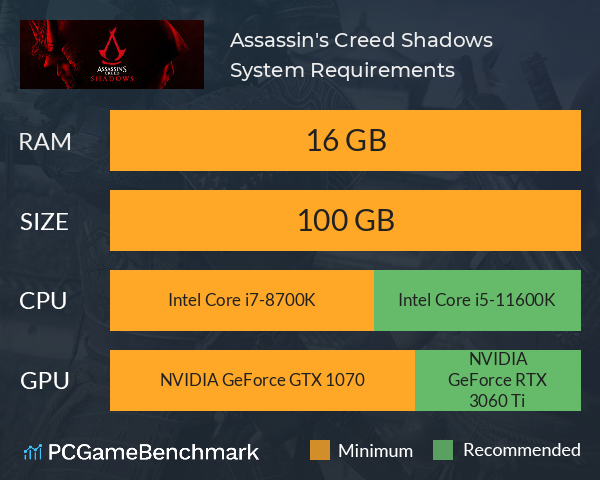
| Minimum | Recommended | |
| CPU | Intel Core i7-8700K or Ryzen 5 3600 | Intel Core i5-11600K or Ryzen 5 5600X |
| Graphics Card | NVIDIA GeForce GTX 1070 or Radeon RX 5700 | NVIDIA GeForce RTX 3060 Ti or Radeon RX 6700 XT |
| RAM | 16 GB | 16 GB |
| File Size | 100 GB | 100 GB |
| OS | Windows 10 64-bit or higher | up to Windows 11 |
Can you run it? Test your computer against Assassin's Creed Shadows system requirements.

Can I Run Assassin's Creed Shadows?
To run the Assassin's Creed Shadows requirements, you will need an NVIDIA GeForce GTX 1070 GPU, an Intel Core i7-8700K CPU, 16GB of RAM, and up to 100GB of SSD space.
Overall, the Assassin's Creed Shadows system requirements aren't particularly demanding for Windows 10 OS PCs and laptops. The only hurdle anyone might encounter is the 16GB of RAM requirement. Fortunately, this can easily be overcome with a simple RAM upgrade, which isn't too difficult so long as there are RAM slots available and the existing RAM isn't soldered into place.
The Windows 10 or 11 OS Assassin's Creed Shadows minimum requirements require an AMD Ryzen 5 3600 CPU, an AMD Radeon RX 5700 graphics card, and 16GB of RAM. Considering the game runs on a five-year-old GPU, most modern mid-range laptops and PCs should have no issues getting the game to run.
The Assassin's Creed Shadows recommended specs are where the hardware demand takes a small leap, requiring an NVIDIA GeForce RTX 3060 Ti GPU, an Intel Core i5 11600K CPU, and 16GB of RAM. This should be enough hardware to guarantee a smooth gameplay experience on the "Medium" or higher graphics settings, but won't be enough to render the game at its very best.
Unfortunately, to get the best AC Shadows experience and meet the Assassin's Creed Shadows ultra specs for full ray tracing, you'll need an NVIDIA GeForce RTX 4080 GPU, an Intel Core i7 13700K CPU. This is essentially some of the latest hardware out there.
Assassin's Creed Shadows benchmark
Not sure if you meet the AC Shadows PC requirements? Ubisoft's latest title can be quite challenging depending on which graphics presets you elect to activate. So, take our Assassin's Creed Shadows benchmark test using our automatic checker or by manually entering your system details to see how well you can run it.
If, despite all this, you're finding the game isn't running well on your setup, you might want to tweak the Assassin's Creed Shadows settings to get the best FPS rate. Honestly, though, you'll want to try and run the AC Shadows settings at their maximum as there is a significant difference between the lowest and highest settings. You'll need a GPU with a VRAM of about 8GB or better to achieve this, so you'll only really need to drop the settings if your graphics card has less than 8GB of VRAM.
Assassin's Creed Shadows size - How big is AC Shadows?
The Assassin's Creed Shadows download size on PC is 100GB of SSD space. On consoles, AC Shadows will demand a similar amount of space.
So, if you need more space or want to make an upgrade, check the PCGamesN buyers guide for the best SSD for gaming or just check the latest, best prices for SSDs.
Assassin's Creed Shadows Steam Deck
Surprisingly, the official Assassin's Creed Shadows Steam Deck support sits at "Verified". Previously, Ubisoft's own Technology Director Pierre F had stated that the game's minimum specs for PC were simply too high for the Steam Deck to run the game. Despite this, the game launched on March 20, 2025 with the coveted "Verified" rating for Steam Deck.
Assassin's Creed Shadows guides
Looking for the latest Assassin's Creed Shadows news and guides? PCGamesN has you covered for everything, starting with the Assassin's Creed Shadows review.
If you are playing then see a full Assassin's Creed Shadows quest list, all of the Assassin's Creed Shadows bosses and how to beat them, and an AC shadows allies list and how to recruit them. See where to find all of the Assassin's Creed Shadows legendary gear, and which Assassin's Creed Shadows cast and voice actors were behind your favorite characters. And check their guide to Assassin's Creed romance options.
If you want more from the game, then see the list of the best Assassin's Creed Shadows mods.
Assassin's Creed Shadows will run on PC system with Windows 10 64-bit or higher and upwards.
Looking for an upgrade? See our graphics card comparison and CPU compare for benchmarks. We'll help you find the best deal for the right gear to run the game.
Assassin's Creed Shadows FPS - what frame rate can you expect?
How many FPS will I get on Assassin's Creed Shadows? An FPS Monitor is the first step in understanding how the parts in your gaming PC are actually performing in real-world conditions. It's the perfect way to track Assassin's Creed Shadows FPS drops and stutters.
Download our free tool on Overwolf to count your frame rates as you play, and test how tweaks to your settings can boost FPS and increase Assassin's Creed Shadows performance. Our app is compatible with hundreds of the best PC games and available now.
Assassin's Creed Shadows Details
| Player Count | 1,203 Players (Last 24 Hours) |
| Review Score | 81 / 100 |
| Download | Buy Assassin's Creed Shadows now |
| Categories | Action RPG Adventure |
| Assassin's Creed Shadows Release Date | 19th of March 2025 |
| Assassin's Creed Shadows PC price today | $69.99 |
Experience an epic action-adventure story set in feudal Japan! Become a lethal shinobi assassin and powerful legendary samurai as you explore a beautiful open world in a time of chaos.