

Balls Crush Simulator System Requirements
Balls Crush Simulator system requirements 2025 - can your PC run Balls Crush Simulator?
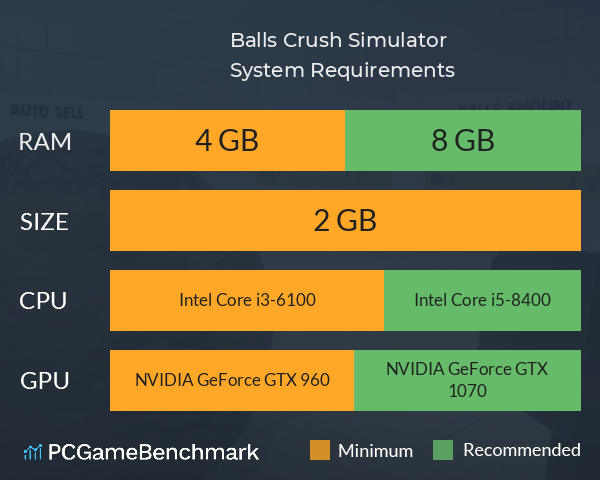
| Minimum | Recommended | |
| CPU | Intel Core i3-6100 | Intel Core i5-8400 |
| Graphics Card | NVIDIA GeForce GTX 960 | NVIDIA GeForce GTX 1070 |
| RAM | 4 GB | 8 GB |
| File Size | 2 GB | 2 GB |
| OS | 64-bit Windows 10, Windows 11 | 64-bit Windows 10, Windows 11 |
Can you run it? Test your computer against Balls Crush Simulator system requirements.
Can I Run Balls Crush Simulator?
The cheapest graphics card you can play it on is an NVIDIA GeForce GTX 960. Furthermore, an NVIDIA GeForce GTX 1070 is recommended in order to run Balls Crush Simulator with the highest settings. To play Balls Crush Simulator you will need a minimum CPU equivalent to an Intel Core i3-6100. Whereas, an Intel Core i5-8400 is recommended in order to run it. Balls Crush Simulator system requirements state that you will need at least 4 GB of RAM. Additionally, the game developers recommend somewhere around 8 GB of RAM in your system. You will need at least 2 GB of free disk space to install Balls Crush Simulator.
Balls Crush Simulator will run on PC system with 64-bit Windows 10, Windows 11 and upwards.
Looking for an upgrade? See our graphics card comparison and CPU compare for benchmarks. We'll help you find the best deal for the right gear to run the game.
Balls Crush Simulator FPS - what frame rate can you expect?
How many FPS will I get on Balls Crush Simulator? An FPS Monitor is the first step in understanding how the parts in your gaming PC are actually performing in real-world conditions. It's the perfect way to track Balls Crush Simulator FPS drops and stutters.
Download our free tool on Overwolf to count your frame rates as you play, and test how tweaks to your settings can boost FPS and increase Balls Crush Simulator performance. Our app is compatible with hundreds of the best PC games and available now.
Balls Crush Simulator Details

| Download | Via Steam |
| Categories | Indie Simulation |
| Balls Crush Simulator Release Date | 9th of October 2024 |
| Balls Crush Simulator PC price today | $2.99 |
The only simulator where you can crush balls with fun and pleasure!