

Cricket 22 System Requirements
Cricket 22 System Requirements - full specs, system checker and the gaming PC setup you need.
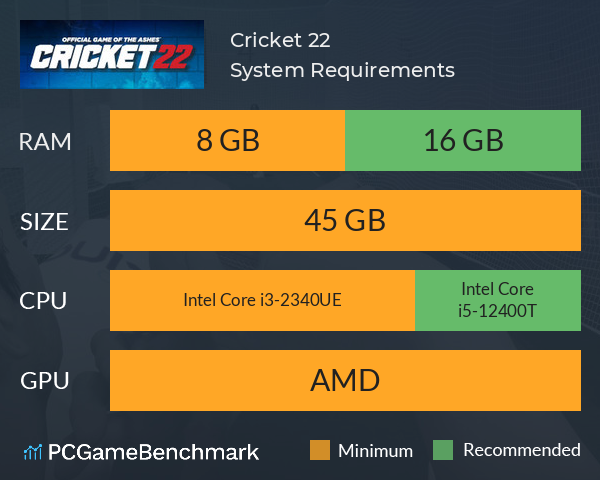
| Minimum | Recommended | |
| CPU | Intel Core i3-2340UE | Intel Core i5-12400T |
| Graphics Card | Unknown | Unknown |
| RAM | 8 GB | 16 GB |
| File Size | 45 GB | 45 GB |
| OS | Windows 10 or higher | Windows 10 or higher |
Can you run it? Test your computer against Cricket 22 system requirements.
Can I Run Cricket 22?
The minimum memory requirement for Cricket 22 is 8 GB of RAM installed in your computer. If possible, make sure your have 16 GB of RAM in order to run Cricket 22 to its full potential. Provided that you have at least a modern graphics card you can play the game. An Intel Core i3-2340UE CPU is required at a minimum to run Cricket 22. Whereas, an Intel Core i5-12400T is recommended in order to run it. You will need at least 45 GB of free disk space to install Cricket 22.
Cricket 22 will run on PC system with Windows 10 or higher and upwards.
Looking for an upgrade? See our graphics card comparison and CPU compare for benchmarks. We'll help you find the best deal for the right gear to run the game.
Cricket 22 FPS - what frame rate can you expect?
How many FPS will I get on Cricket 22? An FPS Monitor is the first step in understanding how the parts in your gaming PC are actually performing in real-world conditions. It's the perfect way to track Cricket 22 FPS drops and stutters.
Download our free tool on Overwolf to count your frame rates as you play, and test how tweaks to your settings can boost FPS and increase Cricket 22 performance. Our app is compatible with hundreds of the best PC games and available now.
Cricket 22 Details
| Player Count | 18 Players (Last 24 Hours) |
| Download | Via Steam |
| Categories | Sports Simulation Early Access |
| Cricket 22 Release Date | 1st of December 2021 |
| Cricket 22 PC price today | $44.99 |
Cricket 22 delivers the Ashes, the Big Bash, The Hundred, and a multitude of other fan-favourite competitions! All-new mechanics, commentary, and a captivating, narrative driven career mode, will immediately immerse you in the ultimate cricket experience to date.