

Crusader Kings 3 System Requirements
Crusader Kings 3 System Requirements - full specs, system checker and the gaming PC setup you need.
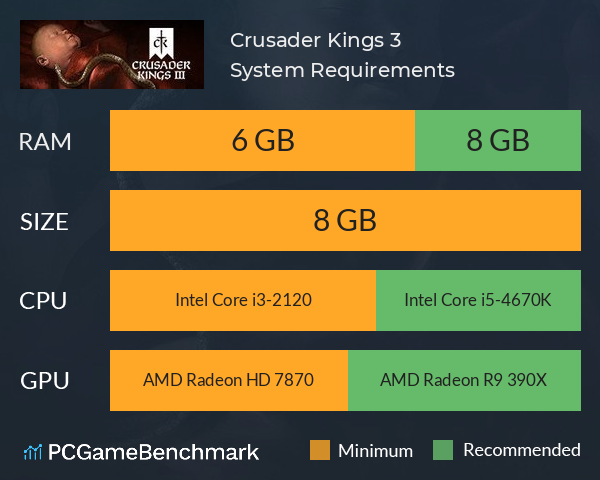
| Minimum | Recommended | |
| CPU | Intel Core i3-2120 | Intel Core i5-4670K |
| Graphics Card | AMD Radeon HD 7870 | AMD Radeon R9 390X |
| RAM | 6 GB | 8 GB |
| File Size | 8 GB | 8 GB |
| OS | Windows® 8.1 64 bit / Windows® 10 Home 64 bit | Windows® 10 Home 64 bit |
Can you run it? Test your computer against Crusader Kings 3 system requirements.

Can I Run Crusader Kings 3?
The Crusader Kings 3 system requirements ask for at least 8 GB of free storage space to install the game. You'll need a minimum of 6 GB RAM, however the developers recommend 8 GB. The minimum graphics card you can play it on is equivalent to an AMD Radeon HD 7870. However, the recommended graphics card is an AMD Radeon R9 390X or better. The CK3 system requirements ask for a minimum CPU equivalent to an Intel Core i3-2120, but the recommended CPU is an Intel Core i5-4670K.
The Crusader Kings 3 release date was the 1st September 2020 - the game is now out!
There is a Crusader Kings 3 Steam release, as well as there being a Crusader Kings 3 Game Pass release.
Improve Performance in Crusader Kings 3
- Try closing any unnecessary background applications that may be taking up RAM bottlenecking CK3 - for example: Google Chrome, Discord, or GeForce Experience.
- Ensure you have the latest graphics drivers installed for your graphics card.
- Keep display mode in 'Fullscreen' mode as opposed to Windowed. Windowed mode will lower your FPS.
- Keep anti-aliasing Low, or switched off altogether if you are still struggling.
Crusader Kings 3 will run on PC system with Windows® 8.1 64 bit / Windows® 10 Home 64 bit and upwards. Additionally it has Mac and Linux versions.
Looking for an upgrade? See our graphics card comparison and CPU compare for benchmarks. We'll help you find the best deal for the right gear to run the game.
Crusader Kings 3 FPS - what frame rate can you expect?
How many FPS will I get on Crusader Kings 3? We reference thousands of reports from PCGameBenchmark users running our free tool on Overwolf to tell you exactly how Crusader Kings 3 performs across a range of different settings and resolutions on the most popular PC gaming setups.
What frame rate does Crusader Kings 3 run at?
Here are the typical frame rate samples
| Avg FPS | CPU | GPU | RAM |
| 90 | Intel Core i5-10400F | NVIDIA GeForce RTX 3070 | 16 GB |
| 52 | Intel Core i9-9900KF | NVIDIA GeForce RTX 4060 | 48 GB |
| 49 | Intel Core i5-10400F | NVIDIA GeForce GTX 1650 | 24 GB |
| 45 | Intel Core i5-9400F | NVIDIA GeForce GTX 1650 | 8 GB |
| 32 | Intel Core i5-8400 | NVIDIA GeForce GTX 1060 3GB | 8 GB |
What frame rate does Crusader Kings 3 run at? Check our FPS Calculator
Are you experiencing Crusader Kings 3 FPS drops and stutters? Want to know exactly how the game performs on your system? You can get a free easy FPS test for all your games using the PCGameBenchmark FPS monitor tool - your first step to understanding how the parts in your gaming PC are actually performing in real-world conditions.
Crusader Kings 3 Mac OS system requirements (minimum)
- Memory:12 GB
- Graphics Card:AMD Radeon Pro 560
- CPU:Intel Core i7-7820HQ
- File Size:8 GB
- OS:Mojave (MAC OS X 10.14)
Crusader Kings 3 Linux system requirements (minimum)
- Memory:4 GB
- Graphics Card:AMD Radeon HD 7870
- CPU:Intel Core i3-2120
- File Size:8 GB
- OS:Ubuntu 18.04
Crusader Kings 3 Details
| Player Count | 14,510 Players (Last 24 Hours) |
| Review Score | 91 / 100 |
| Download | Play now |
| Categories | Strategy RPG Simulation |
| Crusader Kings 3 Release Date | 1st of September 2020 |
| Crusader Kings 3 PC price today | $49.99 |
Love, fight, scheme, and claim greatness. Determine your noble house’s legacy in the sprawling grand strategy of Crusader Kings III. Death is only the beginning as you guide your dynasty’s bloodline in the rich and larger-than-life simulation of the Middle Ages.