

Dragon Age Veilguard system requirements
Full Dragon Age The Veilguard system requirements, with the minimum and recommended specs you need to play the game.
| Minimum | Recommended | |
| CPU | Intel Core i5-8400 or Ryzen 3 3300X | Intel Core i9-9900K or Ryzen 7 3700X |
| Graphics Card | NVIDIA GeForce GTX 970 or Radeon R9 290X | NVIDIA GeForce RTX 2070 or Radeon RX 5700 XT |
| RAM | 16 GB | 16 GB |
| File Size | 100 GB | 100 GB |
| OS | Windows 10 64-bit or higher | up to Windows 11 |
Can you run it? Test your computer against Dragon Age Veilguard system requirements.
Can I Run Dragon Age Veilguard?
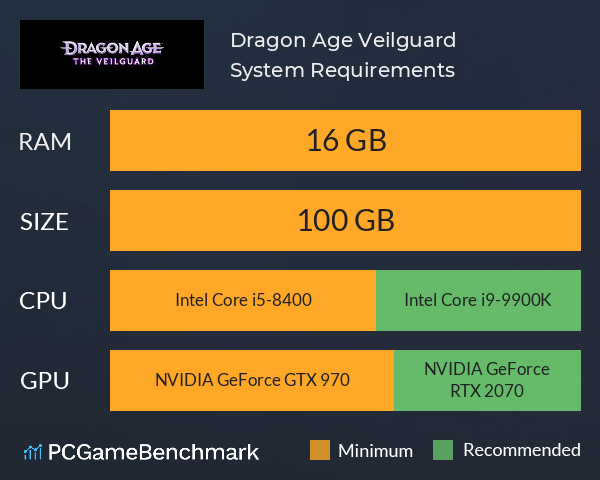
To run the Dragon Age The Veilguard system requirements, you need an NVIDIA GTX 970 GPU, an Intel Core i5-8400 CPU, 16GB of RAM, and 100GB of SSD space.
The Steam listing for Dragon Age Veilguard illustrates just how graphically superior Veilguard is compared to previous entries in the series, and with greater graphics come greater Dragon Age PC requirements.
The Dragon Age Veilguard minimum requirements need an AMD Radeon R9 290X graphics card, an AMD Ryzen 3 3300X processor, and 16GB of RAM. This is a suprisingly high entry bar for RAM, yet a surprisingly low bar for a graphics card. With some of the game's environments possessing detail that rivals that of Baldur's Gate 3, it's not surprising that higher graphics settings need a much higher hardware benchmark.
To ensure you can play the game at a higher level and meet the Dragon Age Veilguard recommended specs, you will require at least an NVIDIA GeForce RTX 2070 GPU, an Intel Core i9-9900K CPU, and 16GB of RAM.
Still unsure if you meet the Dragon Age Veilguard requirements? Take our free and easy benchmark test with our automatic checker or by manually entering your system details to see if you can run Dragon Age Veilguard.
Dragon Age Veilguard size - How big is Veilguard?
The Dragon Age Veilguard download size on PC is around 100GB of SSD space. On consoles, Veilguard demands about 92.7GB of storage space.
As HDDs are becoming increasingly obsolete, you may well have to upgrade to an SSD in order to run the game. So, if you need more space or want to make an upgrade, check the PCGamesN buyers guide for the best SSD for gaming or just check the latest, best prices for SSDs.
Dragon Age Veilguard guides
Looking for the best Dragon Age 4 guides? Check out PCGamesN for everything you could ever need to know about Veilguard, including:
- Full Dragon Age Veilguard skills list
- Complete Dragon Age Veilguard companions list
- All Dragon Age Veilguard weapons
- All Dragon Age Veilguard classes and specializations
- What are the Dragon Age Veilguard factions?
- Who are the Dragon Age Veilguard voice actors and their characters?
Dragon Age Veilguard will run on PC system with Windows 10 64-bit or higher and upwards.
Looking for an upgrade? See our graphics card comparison and CPU compare for benchmarks. We'll help you find the best deal for the right gear to run the game.
Dragon Age Veilguard FPS - what frame rate can you expect?
How many FPS will I get on Dragon Age Veilguard? An FPS Monitor is the first step in understanding how the parts in your gaming PC are actually performing in real-world conditions. It's the perfect way to track Dragon Age Veilguard FPS drops and stutters.
Download our free tool on Overwolf to count your frame rates as you play, and test how tweaks to your settings can boost FPS and increase Dragon Age Veilguard performance. Our app is compatible with hundreds of the best PC games and available now.
Dragon Age Veilguard Details
| Player Count | 764 Players (Last 24 Hours) |
| Review Score | 83 / 100 |
| Download | Via Steam |
| Categories | Action Strategy RPG |
| Dragon Age Veilguard Release Date | 31st of October 2024 |
| Dragon Age Veilguard PC price today | $27.00 55% saving |
Unite the Veilguard and defy the gods in Dragon Age™: The Veilguard, an immersive single-player RPG.