

F1 2020 System Requirements
F1 2020 System Requirements - full specs, system checker and the gaming PC setup you need.
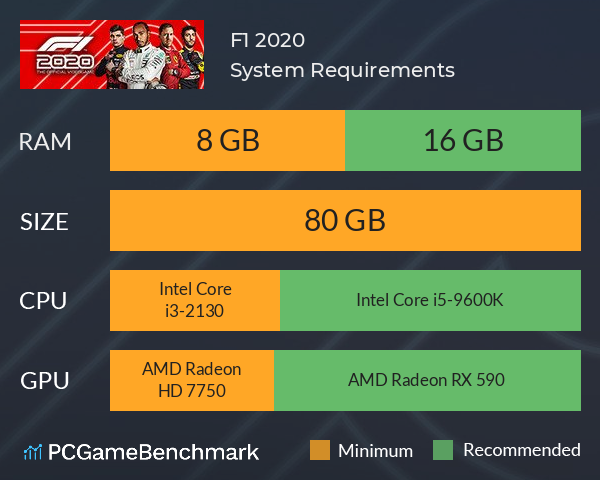
| Minimum | Recommended | |
| CPU | Intel Core i3-2130 | Intel Core i5-9600K |
| Graphics Card | AMD Radeon HD 7750 | AMD Radeon RX 590 |
| RAM | 8 GB | 16 GB |
| File Size | 80 GB | 80 GB |
| OS | 64 bit Windows 10 | 64 bit Windows 10 |
Can you run it? Test your computer against F1 2020 system requirements.

Can I Run F1 2020?
F1 2020 system requirements state the minimum graphics card required to run the game is equivalent to an AMD Radeon HD 7750. However, the recommended GPU is an AMD Radeon RX 590 to run the game at the higher settings. The minimum memory requirement for F1 2020 is 8 GB of RAM installed on your computer. If possible, make sure you have 16 GB of RAM for the best experience. In terms of game file size, you will need at least 80 GB of free disk space available. An Intel Core i3-2130 CPU is required at a minimum to run F1 2020. Whereas, an Intel Core i5-9600K is recommended.
F1 2020 Performance Guide
Looking to get an F1 2020 FPS boost? Here are some tips.
- As you should with all games, ensure you have the latest graphics cards drivers installed for the best performance
- Run the game in fullscreen mode as opposed to windowed.
- F1 2020 is particularly demanding for RAM - shut any unnecessary RAM heavy programs before running the game. You can see how much RAM programs are using by opening the Task Manager (Ctrl + Shift + Esc)
F1 2020 Wheel
For the best experience in F1 2020 you'll want a dedicated racing wheel, although a controller is a decent compromise - you do not want to be playing this game with a mouse and keyboard. The wheel we'd recommend is the Logitech G29, with 920 degree rotation, force feedback and good build quality. This wheel is plug and play compatible with F1 2020 too.
F1 2020 Controller Settings
The experience with a controller in F1 2020 is pretty good straight out of the box and there's not much you'll need to adjust. The only thing you might want to play around with is 'Steering Linearity' - this relates to how much the wheel turns compared to how much you move the joystick - this is personal preference, so adjust this and see what feels right for you.
F1 2020 will run on PC system with 64 bit Windows 10 and upwards.
Looking for an upgrade? See our graphics card comparison and CPU compare for benchmarks. We'll help you find the best deal for the right gear to run the game.
F1 2020 FPS - what frame rate can you expect?
How many FPS will I get on F1 2020? We reference thousands of reports from PCGameBenchmark users running our free tool on Overwolf to tell you exactly how F1 2020 performs across a range of different settings and resolutions on the most popular PC gaming setups. Here’s a selection of our most recent test results.
What frame rate does F1 2020 run at?
Here are the typical frame rate samples
| Avg FPS | CPU | GPU | RAM |
| 116 | Intel Core i7-10750H | NVIDIA GeForce RTX 3060 Laptop GPU | 16 GB |
| 40 | Intel Core i5-6500 | NVIDIA Quadro K2200 | 16 GB |
| 36 | Intel Core i5-7200U | NVIDIA GeForce 920MX | 8 GB |
What frame rate does F1 2020 run at? Check our FPS Calculator
Are you experiencing F1 2020 FPS drops and stutters? Want to know exactly how the game performs on your system? You can get a free easy FPS test for all your games using the PCGameBenchmark FPS monitor tool - your first step to understanding how the parts in your gaming PC are actually performing in real-world conditions.
F1 2020 Details
| Player Count | 108 Players (Last 24 Hours) |
| Review Score | 88 / 100 |
| Download | F1 2020 Steam |
| Categories | Racing Sports Simulation |
| F1 2020 Release Date | 9th of July 2020 |
| F1 2020 PC price today | $59.99 |
F1® 2020 allows you to create your F1® team for the very first time and race alongside the official teams and drivers. Alternatively, challenge your friends in new split-screen with casual race options for more relaxed racing. Compete on 22 circuits, with current and classic content.