

Farming Simulator 25 system requirements
Full Farming Simulator requirements on PC, including minimum and recommended specs needed to start your very own virtual farm.
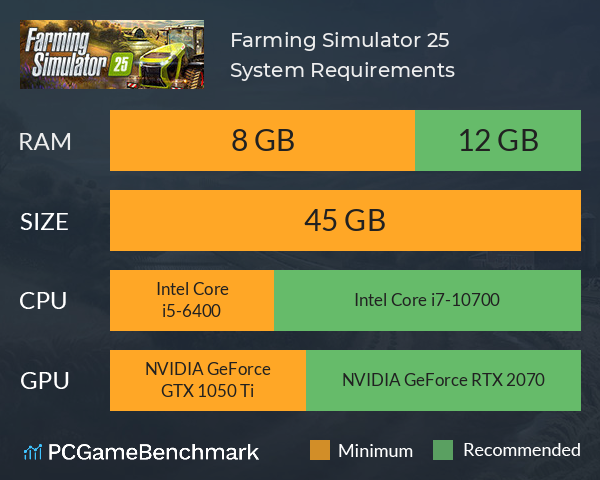
| Minimum | Recommended | |
| CPU | Intel Core i5-6400 or Ryzen 5 1400 | Intel Core i7-10700 or Ryzen 7 3800X |
| Graphics Card | NVIDIA GeForce GTX 1050 Ti or Radeon RX 470 | NVIDIA GeForce RTX 2070 or Radeon RX 5700 XT |
| RAM | 8 GB | 12 GB |
| File Size | 45 GB | 45 GB |
| OS | Windows 10 64bit | Windows 10 64bit |
Can you run it? Test your computer against Farming Simulator 25 system requirements.
Can I Run Farming Simulator 25?
To run the Farming Simulator system requirements, you will need an AMD Radeon RX 470 GPU, an AMD Ryzen 5 1400 CPU, 8GB of RAM, and 45GB of HDD or SSD space.
The Farming Simulator 25 PC requirements are certainly a bit higher than its predecessors, but nothing that most laptops or gaming PCs will have any difficulties meeting. In fact, so long as your device is less than five years old, you shouldn't have any problems getting the game to run.
The Farming Simulator 25 minimum requirements only need an NVIDIA GeForce GTX 1050 Ti graphics card, an Intel Core i5-6400 processor, and 8GB of RAM. This level of hardware should be more than enough to achieve a stable 30FPS+ in-game, even if you do create a sprawling farm.
However, if you want to render your American, European, or East Asian farm at their absolute finest, you'll need much fancier hardware.
In order to meet the Farming Simulator 25 recommended specs, you will need an NVIDIA GeForce RTX 2070 GPU, an Intel Core i7-10700 CPU, and 12GB of RAM.
Still unsure if you meet the Farming Simulator requirements? Take our benchmark test using our automatic checker or by manually entering your system details to see how well your PC can run the farm.
Farming Simulator 25 size - How big is Farm Simulator 25?
The Farming Simulator 25 download size on PC requires 45GB of HDD or SSD space. While the developer hasn't stated that an SSD is required, you'll almost certainly want it on the higher graphics presets to reduce loading times and increase your game's overall performance.
So, if you need more space or want to make an upgrade, check the PCGamesN buyers guide for the best SSD for gaming or just check the latest, best prices for SSDs.
Farming Simulator 25 will run on PC system with Windows 10 64bit and upwards. Additionally it has a Mac version.
Looking for an upgrade? See our graphics card comparison and CPU compare for benchmarks. We'll help you find the best deal for the right gear to run the game.
Farming Simulator 25 FPS - what frame rate can you expect?
How many FPS will I get on Farming Simulator 25? We reference thousands of reports from PCGameBenchmark users running our free tool on Overwolf to tell you exactly how Farming Simulator 25 performs across a range of different settings and resolutions on the most popular PC gaming setups. Here’s a selection of our most recent test results.
What frame rate does Farming Simulator 25 run at?
Here are the typical frame rate samples
| Avg FPS | CPU | GPU | RAM |
| 69 | Intel Core Ultra 7 265KF | NVIDIA GeForce RTX 4070 Ti SUPER | 64 GB |
| 47 | Intel Core i9-9900 | Intel UHD 630 | 32 GB |
| 28 | Intel Core i7-9750H | NVIDIA GeForce RTX 2060 | 16 GB |
What frame rate does Farming Simulator 25 run at? Check our FPS Calculator
Are you experiencing Farming Simulator 25 FPS drops and stutters? Want to know exactly how the game performs on your system? You can get a free easy FPS test for all your games using the PCGameBenchmark FPS monitor tool - your first step to understanding how the parts in your gaming PC are actually performing in real-world conditions.
Farming Simulator 25 Mac OS system requirements (minimum)
- Memory:8 GB
- Graphics Card:NVIDIA GeForce GTX 1050 Ti
- CPU:Intel Core i5-6400
- File Size:45 GB
- OS:TbD
Farming Simulator 25 Details
| Player Count | 13,047 Players (Last 24 Hours) |
| Download | Buy Farming Simulator 25 now |
| Category | Simulation |
| Farming Simulator 25 Release Date | 12th of November 2024 |
| Farming Simulator 25 PC price today | $49.99 |
Farming Simulator 25 invites you to join the rewarding farm life, single-handedly or cooperatively in multiplayer. This Farm is Your Farm!