

FIFA 21 System Requirements
FIFA 21 System Requirements - full specs, system checker and the gaming PC setup you need.
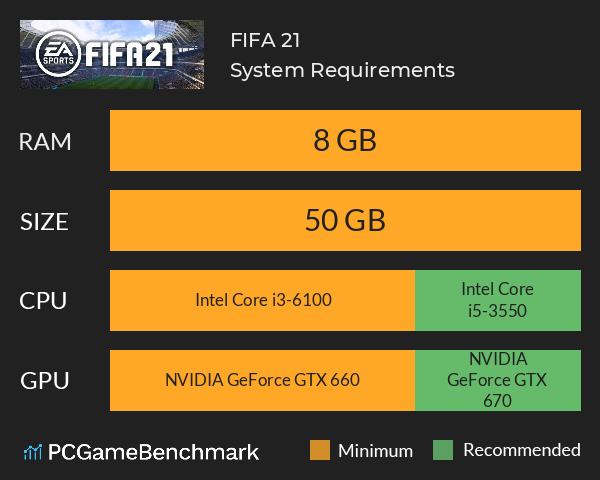
| Minimum | Recommended | |
| CPU | Intel Core i3-6100 | Intel Core i5-3550 |
| Graphics Card | NVIDIA GeForce GTX 660 | NVIDIA GeForce GTX 670 |
| RAM | 8 GB | 8 GB |
| File Size | 50 GB | 50 GB |
| OS | Windows 10 64-Bit | Windows 10 |
Can you run it? Test your computer against FIFA 21 system requirements.
Can I Run FIFA 21?
The FIFA 21 system requirements include a minimum CPU equivalent to an Intel Core i3-6100 CPU, whereas the recommended CPU is an Intel Core i5-3550. The minimum RAM required for FIFA 21 is 8 GB. The cheapest graphics card you can play it on is an NVIDIA GeForce GTX 660, but a GTX 670 or better is recommended. The FIFA 21 PC requirements state that you will need at least 50 GB free storage space to install the game.
It's worth noting that unfortunately the PC release of FIFA 21 is based on the last-gen version for PS4 and Xbox One. This explains the somewhat low requirements for a 2020 release game. Hopefully, with FIFA 22 we'll see the PC release taking full advantage of next-gen hardware.
The differences between the standard FIFA 21 and FIFA 21 Ultimate Editioninclude3 days early access, 24 Gold FUT packs, a new career mode and special FUT kits.
FIFA 21 Steam
FIFA 21 is available on Steam - the first FIFA game to have been, as well as being available through EA's own Origin client.
Make sure you have the latest NVIDIA Drivers or AMD Drivers for your graphics card when FIFA 21 releases to ensure optimal performance.
FIFA 21 Performance Guide
You shouldn't run into too many problems in the latest instalment of FIFA due to the undemanding system requirements, but if you are struggling to get a decent FPS in FIFA 21, Here are some things to try.
Disable background applications such as GeForce Experience or Windows Game DVR
Ensure you have the latest graphics cards drivers for NVIDIA/AMD installed.
Run the game in fullscreen as opposed to windowed, and set rendering quality to Medium and MSAA to 2x.
Disable hardware acceleration in applications such as Discord to free up GPU bandwidth for running FIFA 21
Latest FIFA game
With EA departing from the FIFA licence, check your PC specs against the EA FC 24 PC Requirements and keep your eyes peeled for the rumored FIFA 24 replacement.
FIFA 21 will run on PC system with Windows 10 64-Bit and upwards.
Looking for an upgrade? See our graphics card comparison and CPU compare for benchmarks. We'll help you find the best deal for the right gear to run the game.
FIFA 21 FPS - what frame rate can you expect?
How many FPS will I get on FIFA 21? An FPS Monitor is the first step in understanding how the parts in your gaming PC are actually performing in real-world conditions. It's the perfect way to track FIFA 21 FPS drops and stutters.
Download our free tool on Overwolf to count your frame rates as you play, and test how tweaks to your settings can boost FPS and increase FIFA 21 performance. Our app is compatible with hundreds of the best PC games and available now.
FIFA 21 Details
| Review Score | 75 / 100 |
| Download | FIFA 21 Download |
| Category | Sports |
| FIFA 21 Release Date | 9th of October 2020 |
Win as One in FIFA 21, powered by Frostbite. FIFA 21 has more ways to play than ever before - including the UEFA Champions League and CONMEBOL Libertadores. Like the previous games in the series, you will be able to manage your ultimate team on the go through the FUT app, on desktop or mobile.