

Gray Zone Warfare requirements
Full Gray Zone Warfare requirements for PC, with full minimum and recommended specs
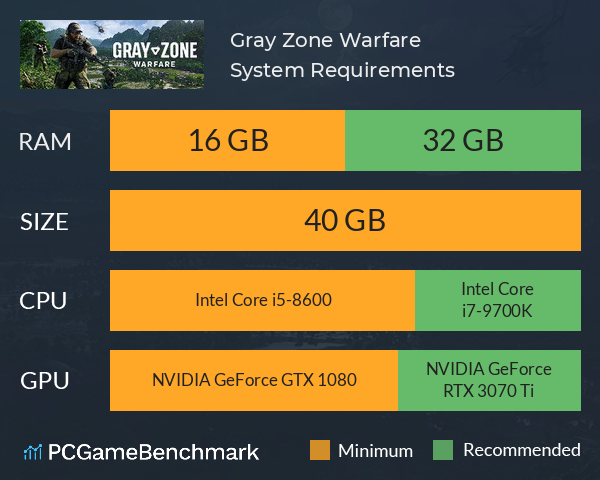
| Minimum | Recommended | |
| CPU | Intel Core i5-8600 or Ryzen 5 2600 | Intel Core i7-9700K or Ryzen 5 3600X |
| Graphics Card | NVIDIA GeForce GTX 1080 or Radeon RX 5700 | NVIDIA GeForce RTX 3070 Ti or Radeon RX 6800 |
| RAM | 16 GB | 32 GB |
| File Size | 40 GB | 40 GB |
| OS | Windows® 10 64 Bit | Windows® 10 64 Bit / Windows® 11 64 Bit (latest update) |
Can you run it? Test your computer against Gray Zone Warfare system requirements.
Can I Run Gray Zone Warfare?
To run the Gray Zone Warfare system requirements, you will need an NVIDIA GeForce GTX 1080 GPU, an Intel Core i5-8600 CPU, 16GB of RAM, and 40GB of HD space.
Gray Zone Warfare has only just launched to Early Access, but you'll find that the Gray Zone Warfare PC requirements are quite accessible. Unfortunately, you'll also find a number of performance issues are persistent for a lot of players, so you may want to aim for a higher level of hardware than the developer recommends.
To meet the Gray Zone Warfare minimum requirements, the developer states that you'll need an AMD Radeon RX 5700 graphics card, an AMD Ryzen 5 2600 processor, and 16GB of RAM. However, it is worth bearing in mind that many players have noted the game suffers from some major FPS issues, so we recommend aiming for a higher benchmark.
The Gray Zone Warfare recommended specs state that an NVIDIA GeForce RTX 3070 Ti GPU, an Intel Core i7-9700K CPU, and 32GB of RAM are required to run the game at its best. Unfortunately, many players are reporting that the game runs at less than 60FPS even on the lowest settings on hardware at this level.
As the game is in Early Access, it is quite likely that much of these performance issues can be attributed to optimization issues that will be addressed as the game is developed, so make sure to check back later to see if the developer has updated the Gray Zone Warfare requirements.
Gray Zone Warfare size
The Gray Zone Warfare download size for PC sits at 40GB of HDD or SSD space. We recommend installing the game on an SSD to reduce the risk of encountering performance issues, especially at this point in the game's development. So, if you need more space or want to make an upgrade, check the PCGamesN buyers guide for the best SSD for gaming.
Gray Zone Warfare performance issues
As previously stated, Gray Zone Warfare is suffering from some major performance issues as of its launch into Early Access. In the wake of this, the developer Madfinger Games has released the following troubleshooting steps to aid players in reducing performance drops when playing Gray Zone Warfare:
- Ensure your GPU has the latest driver.
- If you're using an NVIDIA 3000 series GPU, use the FSR setting, set Frame Generation to "On" and set the Super Resolution setting to "Performance" or "Balanced."
- If you're using a modern graphics card, enable FSR, frame generation, and set the Super Resolution to "Performance" mode.
If you're encountering major frame rate issues when you enter an area for the first time, this is expected behaviour according to the developer. Essentially, as you enter an area for the first time, the game builds its shader cache for that zone, leading to performance drops. It's somewhat unusual to build shaders this way, rather than to preload them ahead of time, but you shouldn't encounter the same performance drop when you enter a previously explored area.
For a guide on how to achieve the best FPS, check out the Gray Zone Warfare settings for max FPS on PCGamesN.
Gray Zone Warfare FAQ
Looking for some additional Gray Zone Warfare guides? PCGamesN has you covered for everything you might need, including:
To complete your Gray Zone Warfare setup, check out the best desks for gaming on the market, giving you a comfortable place to sit even if you are encountering in-game performance issues.
Gray Zone Warfare will run on PC system with Windows® 10 64 Bit and upwards.
Looking for an upgrade? See our graphics card comparison and CPU compare for benchmarks. We'll help you find the best deal for the right gear to run the game.
Gray Zone Warfare FPS - what frame rate can you expect?
How many FPS will I get on Gray Zone Warfare? We reference thousands of reports from PCGameBenchmark users running our free tool on Overwolf to tell you exactly how Gray Zone Warfare performs across a range of different settings and resolutions on the most popular PC gaming setups.
What frame rate does Gray Zone Warfare run at?
Here are the typical frame rate samples
| Avg FPS | CPU | GPU | RAM |
| 201 | Intel Core i9-14900KF | AMD Radeon RX 7900 GRE | 64 GB |
| 110 | Intel Core i5-14400F | NVIDIA GeForce RTX 4070 | 32 GB |
| 61 | Intel Core i9-9900K | Intel UHD 630 | 32 GB |
| 44 | Intel Core i7-7700 | NVIDIA GeForce RTX 3060 | 32 GB |
| 27 | Intel Core i5-10300H | NVIDIA GeForce GTX 1650 | 16 GB |
What frame rate does Gray Zone Warfare run at? Check our FPS Calculator
Are you experiencing Gray Zone Warfare FPS drops and stutters? Want to know exactly how the game performs on your system? You can get a free easy FPS test for all your games using the PCGameBenchmark FPS monitor tool - your first step to understanding how the parts in your gaming PC are actually performing in real-world conditions.
Gray Zone Warfare Details
| Player Count | 1,464 Players (Last 24 Hours) |
| Download | Via Steam |
| Categories | Action Adventure MMO |
| Gray Zone Warfare Release Date | 30th of April 2024 |
| Gray Zone Warfare PC price today | $39.99 |
In Gray Zone Warfare, realism meets tactics in an open-world MMOFPS where every move matters. Deploy with a Private Military Company, survive intense PvEvP or PvE encounters against players and AI, unravel the secrets of Lamang Island, and thrive through hard-earned progression.