

Hades System Requirements
Hades System Requirements - full specs, system checker and the gaming PC setup you need.
| Minimum | Recommended | |
| CPU | Intel Core 2 Duo Q6867 | Intel Core 2 Duo Q6867 |
| Graphics Card | NVIDIA GeForce 8500 GT | AMD Radeon HD 5450 |
| RAM | 4 GB | 8 GB |
| File Size | 15 GB | 20 GB |
| OS | Windows 7 SP1 | Windows 7 SP1 |
Can you run it? Test your computer against Hades system requirements.

Can I Run Hades?
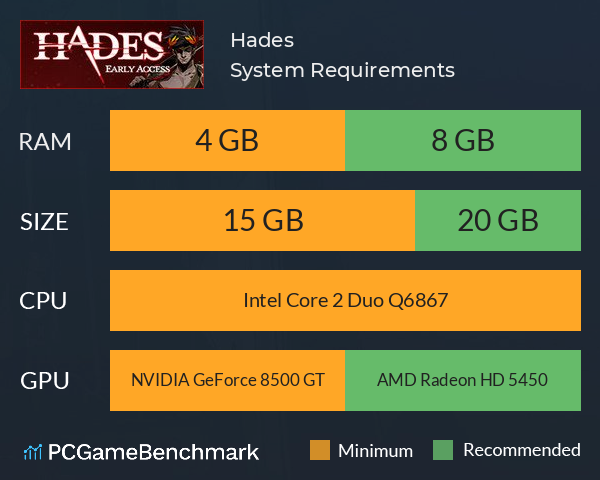
Hades system requirements ask for a minimum graphics card equivalent to an NVIDIA GeForce 8500 GT graphics card you can play the game. But, according to the developers the recommended graphics card is an AMD Radeon HD 5450. In terms of game file size, you will need at least 15 GB of free disk space available. By contrast, the game developers recommend somewhere around 20 GB of free disk space on your system drive. The Hades requirements also ask for a minimum of 4GB of RAM installed in your computer. Additionally, the game developers recommend somewhere around 8 GB of RAM in your system. To Hades PC requirements also ask for a minimum CPU equivalent to an Intel Core 2 Duo Q6867.
Hades Performance Guide
Struggling with your FPS in Hades? Here are some tips.
- Disable background applications such as GeForce Experience or Windows Game DVR
- Run the game in fullscreen as opposed to windowed.
- Disable hardware acceleration in applications such as Discord to free up GPU bandwidth for running AC Syndicate.
Hades will run on PC system with Windows 7 SP1 and upwards. Additionally it has a Mac version.
Looking for an upgrade? See our graphics card comparison and CPU compare for benchmarks. We'll help you find the best deal for the right gear to run the game.
Hades FPS - what frame rate can you expect?
How many FPS will I get on Hades? We reference thousands of reports from PCGameBenchmark users running our free tool on Overwolf to tell you exactly how Hades performs across a range of different settings and resolutions on the most popular PC gaming setups.
What frame rate does Hades run at?
Here are the typical frame rate samples
| Avg FPS | CPU | GPU | RAM |
| 50 | Intel Core i7-10700KF | NVIDIA GeForce RTX 3060 | 16 GB |
| 50 | Intel Core i7-6500U | AMD Radeon R7 M340 | 8 GB |
| 47 | Intel Core i3-10105 | Intel UHD 630 | 8 GB |
| 33 | Intel Core i5-8350U | Intel UHD Graphics 620 | 12 GB |
| 26 | Intel Core i5-6500 | NVIDIA NVS 310 | 16 GB |
What frame rate does Hades run at? Check our FPS Calculator
Are you experiencing Hades FPS drops and stutters? Want to know exactly how the game performs on your system? You can get a free easy FPS test for all your games using the PCGameBenchmark FPS monitor tool - your first step to understanding how the parts in your gaming PC are actually performing in real-world conditions.
Hades Mac OS system requirements (minimum)
- Memory:4 GB
- Graphics Card:Intel HD 5000
- CPU:Intel Core 2 Duo Q6867
- File Size:15 GB
- OS:10.13.6+
Hades Details
| Player Count | 2,542 Players (Last 24 Hours) |
| Review Score | 92 / 100 |
| Download | Hades Download |
| Categories | Action RPG Indie |
| Hades Release Date | 17th of September 2020 |
| Hades PC price today | $24.99 |
Defy the god of the dead as you hack and slash out of the Underworld in this rogue-like dungeon crawler from the creators of Bastion, Transistor, and Pyre.