

State of Decay 2 System Requirements
State of Decay 2 System Requirements - full specs, system checker and the gaming PC setup you need.
| Minimum | Recommended | |
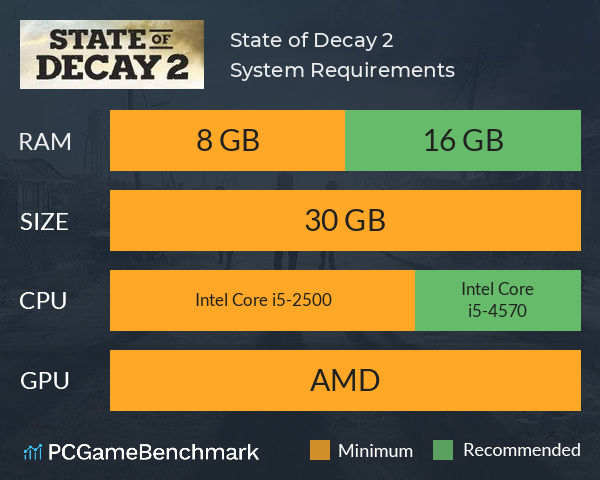
| CPU | Intel Core i5-2500 | Intel Core i5-4570 |
| Graphics Card | Unknown | Unknown |
| RAM | 8 GB | 16 GB |
| File Size | 30 GB | 30 GB |
| OS | Windows 10 64-bit | Windows 10 64-bit |
Can you run it? Test your computer against State of Decay 2 system requirements.
Can I Run State of Decay 2?
An Intel Core i5-2500 CPU is required at a minimum to run State of Decay 2: Juggernaut Edition. Whereas, an Intel Core i5-4570 is recommended in order to run it. State of Decay 2: Juggernaut Edition system requirements state that you will need at least 8 GB of RAM. Additionally, the game developers recommend somewhere around 16 GB of RAM in your system. In terms of game file size, you will need at least 30 GB of free disk space available. Provided that you have at least a modern graphics card you can play the game.
State of Decay 2 will run on PC system with Windows 10 64-bit and upwards.
Looking for an upgrade? See our graphics card comparison and CPU compare for benchmarks. We'll help you find the best deal for the right gear to run the game.
State of Decay 2 FPS - what frame rate can you expect?
How many FPS will I get on State of Decay 2? We reference thousands of reports from PCGameBenchmark users running our free tool on Overwolf to tell you exactly how State of Decay 2 performs across a range of different settings and resolutions on the most popular PC gaming setups.
What frame rate does State of Decay 2 run at?
Here are the typical frame rate samples
| Avg FPS | CPU | GPU | RAM |
| 196 | Intel Core i5-8600K | NVIDIA GeForce GTX 1080 | 32 GB |
| 42 | Intel Core i3-7100 | NVIDIA GeForce GT 710 | 12 GB |
| 38 | Intel Core i7-5500U | Intel HD 5500 | 8 GB |
| 24 | Intel Core i7-9750H | Intel UHD 630 | 16 GB |
What frame rate does State of Decay 2 run at? Check our FPS Calculator
Are you experiencing State of Decay 2 FPS drops and stutters? Want to know exactly how the game performs on your system? You can get a free easy FPS test for all your games using the PCGameBenchmark FPS monitor tool - your first step to understanding how the parts in your gaming PC are actually performing in real-world conditions.
State of Decay 2 Details

| Player Count | 983 Players (Last 24 Hours) |
| Review Score | 69 / 100 |
| Download | Via Steam |
| Categories | Action RPG Simulation |
| State of Decay 2 Release Date | 13th of March 2020 |
| State of Decay 2 PC price today | $29.99 |
The dead have risen and civilization has fallen. Now it's up to you to gather survivors, scavenge for resources and build a community in a post-apocalyptic world – a world where you define what it means to survive in this ultimate zombie survival simulation.