

Valheim System Requirements
Valheim System Requirements - full specs, system checker and the gaming PC setup you need.
| Minimum | Recommended | |
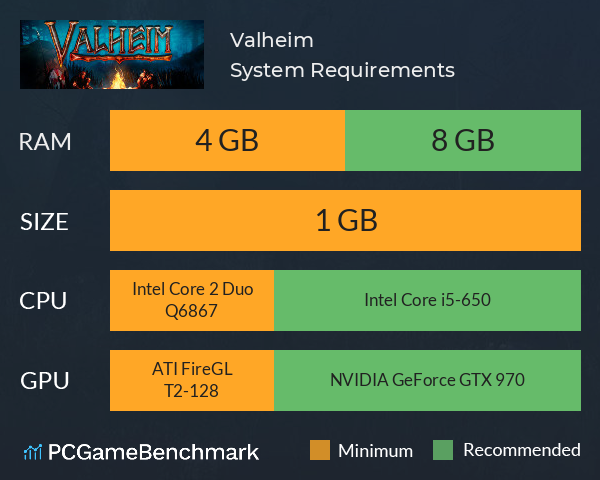
| CPU | Intel Core 2 Duo Q6867 | Intel Core i5-650 |
| Graphics Card | Unknown | NVIDIA GeForce GTX 970 |
| RAM | 4 GB | 8 GB |
| File Size | 1 GB | 1 GB |
| OS | Windows 7 or later | Windows 7 or later |
Can you run it? Test your computer against Valheim system requirements.

Can I Run Valheim?
When it comes to the Valheim system requirements, any PC built in the last few years will be more than capable of running it thanks to the undemanding specs required. The cheapest graphics card you can play it on is a modern graphics card. Furthermore, an NVIDIA GeForce GTX 970 is recommended in order to run Valheim with the highest settings. That's still a six-year-old GPU, so this game shouldn't be a problem for any gaming PC built in the last few years.
The Valheim specs ask for a minimum CPU equivalent to an Intel Core 2 Duo Q6867. Whereas, an Intel Core i5-650 is recommended in order to run it. The Valheim requirements also ask for a minimum of 4GB of RAM installed in your computer, but 8GB is recommended. The Valheim size is just 1GB, so storage shouldn't be a problem either.
Valheim Steam
Valheim is available on Steam via early access, meaning you can play the game as it evolves and grows. Naturally, this also means bugs can occur, so be mindful while you explore Iron Gate's Nordic limbo.
Valheim Christmas patch
Iron Gate just released a new festive Valheim Christmas patch, and it adds quality-of-life updates alongside some bug fixes alongside seasonal treats. Not only can you celebrate Nordic noel while wearing a Santa hat, but you can also put a Christmas tree and lay down gifts at your settlement. The survival game's critters are also more chill, as tamed animals are no longer afraid of fire, and wolves won't howl once they're your pet.
Valheim Settings
If you're looking to boost FPS in Valheim, here are some top tips.
- Close resource-heavy background programs before running Valheim - Open Task Manager (Ctrl + Shift + Esc) to see which programs are using the most resources.
- Run the game in fullscreen as opposed to windowed.
- Ensure you have the latest graphics cards drivers installed.
- Right click Valheim in Steam > Click Properties > Paste "-window-mode exclusive -screen-fullscreen" into the 'Launch Options' entry box.
- Ensure you meet the minimum Valheim recommended specs.
Valheim will run on PC system with Windows 7 or later and upwards. Additionally it has Mac and Linux versions.
Looking for an upgrade? See our graphics card comparison and CPU compare for benchmarks. We'll help you find the best deal for the right gear to run the game.
Valheim FPS - what frame rate can you expect?
How many FPS will I get on Valheim? We reference thousands of reports from PCGameBenchmark users running our free tool on Overwolf to tell you exactly how Valheim performs across a range of different settings and resolutions on the most popular PC gaming setups.
What frame rate does Valheim run at?
Here are the typical frame rate samples
| Avg FPS | CPU | GPU | RAM |
| 79 | Intel Core i9-10900F | NVIDIA GeForce RTX 2080 SUPER | 16 GB |
| 73 | Intel Core i9-9900K | NVIDIA GeForce RTX 4080 | 32 GB |
| 55 | Intel Core i5-9400F | NVIDIA GeForce GTX 1660 Ti | 16 GB |
| 37 | Intel Core i5-9300H | NVIDIA GeForce GTX 1050 | 16 GB |
| 18 | Intel Core i5-4670 | NVIDIA GeForce GTX 775M | 24 GB |
What frame rate does Valheim run at? Check our FPS Calculator
Are you experiencing Valheim FPS drops and stutters? Want to know exactly how the game performs on your system? You can get a free easy FPS test for all your games using the PCGameBenchmark FPS monitor tool - your first step to understanding how the parts in your gaming PC are actually performing in real-world conditions.
Valheim Mac OS system requirements (minimum)
- Memory:4 GB
- Graphics Card:ATI FireGL T2-128
- CPU:Intel Core 2 Duo Q6867
- File Size:1 GB
- OS:OS X 10.9 Mavericks
Valheim Linux system requirements (minimum)
- Memory:4 GB
- Graphics Card:ATI FireGL T2-128
- CPU:Intel Core 2 Duo Q6867
- File Size:1 GB
- OS:Any up to date version
Valheim Details
| Player Count | 19,423 Players (Last 24 Hours) |
| Review Score | 96 / 100 |
| Download | Click here to buy Valheim now |
| Categories | Action RPG Indie |
| Valheim Release Date | 2nd of February 2021 |
| Valheim PC price today | $9.99 50% saving |
A brutal exploration and survival game for 1-10 players, set in a procedurally-generated purgatory inspired by viking culture. Battle, build, and conquer your way to a saga worthy of Odin’s patronage!