

Call of Duty: Black Ops 4 System Requirements
Call of Duty: Black Ops 4 System Requirements - full specs, system checker and the gaming PC setup you need.
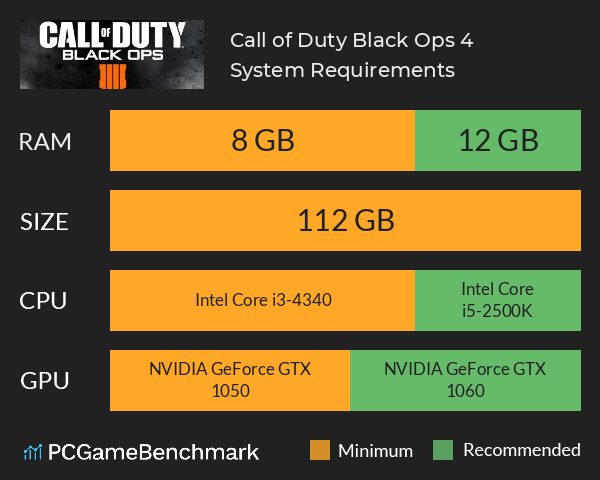
| Minimum | Recommended | |
| CPU | Intel Core i3-4340 | Intel Core i5-2500K |
| Graphics Card | NVIDIA GeForce GTX 1050 | NVIDIA GeForce GTX 1060 |
| RAM | 8 GB | 12 GB |
| File Size | 112 GB | 112 GB |
| OS | Windows 7 | Windows 10 |
Can you run it? Test your computer against Call of Duty: Black Ops 4 system requirements.
Can I Run Call of Duty: Black Ops 4?
An Intel Core i3-4340 CPU is required at a minimum to run Call of Duty: Black Ops 4. However, the developers recommend a CPU greater or equal to an Intel Core i5-2500K to play the game. COD BO4 system requirements state that you will need at least 8 GB. Additionally, the game developers recommend somewhere around 12 GB in your system. The cheapest graphics card you can play it on is an NVIDIA GeForce GTX 1050. But, according to the developers the recommended graphics card is an NVIDIA GeForce GTX 1060. You will need at least 112 GB to install Black Ops 4.
There is no Black Ops 4 Steam release, on PC you can only purchase the game through the Battle.net launcher.
Black Ops 4 Stutter and FPS drops can be solved a number of ways. First ensure you are running the latest NVIDIA or AMD Drivers for your graphics card, or try a clean graphics driver install. Turning off anti-aliasing, triple buffering and vsync can give a large performance boost too. Problems may also be caused by your PC not meeting the minimum requirements of the game. If you are struggling to run the game at a higher resolution, the 'render resolution' option is useful.
For the latest game check out the Black Ops Cold War System Requirements
Looking for a free Call of Duty? Check our Warzone system requirements
Latest COD game
For your next COD game? Check our Call of Duty Modern Warfare 3 system requirements page. For the next game in the Black Ops series, check out the Black Ops 6 system requirements guide
Call of Duty: Black Ops 4 will run on PC system with Windows 7 and upwards.
Looking for an upgrade? See our graphics card comparison and CPU compare for benchmarks. We'll help you find the best deal for the right gear to run the game.
Call of Duty: Black Ops 4 FPS - what frame rate can you expect?
How many FPS will I get on Call of Duty: Black Ops 4? An FPS Monitor is the first step in understanding how the parts in your gaming PC are actually performing in real-world conditions. It's the perfect way to track Call of Duty: Black Ops 4 FPS drops and stutters.
Download our free tool on Overwolf to count your frame rates as you play, and test how tweaks to your settings can boost FPS and increase Call of Duty: Black Ops 4 performance. Our app is compatible with hundreds of the best PC games and available now.
Call of Duty: Black Ops 4 Details
| Review Score | 83 / 100 |
| Download | Black Ops 4 download |
| Categories | Action Sports Violent |
| Call of Duty: Black Ops 4 Release Date | 12th of October 2018 |
Call of Duty®: Black Ops 4 features gritty, grounded, fluid Multiplayer combat, the biggest Zombies offering ever with three full undead adventures at launch, and Blackout, where the universe of Black Ops comes to life in two massive battle royale experiences. Black Ops 4 will be the most robust, refined, and customizable Call of Duty® PC shooter experience ever created with uncapped framerate, 4K resolution, HDR, support for ultrawide monitors and additional features built for the PC community.