

Star Citizen requirements
Latest Star Citizen system requirements, including the new minimum requirements and recommended specs for 2025.
| Minimum | Recommended | |
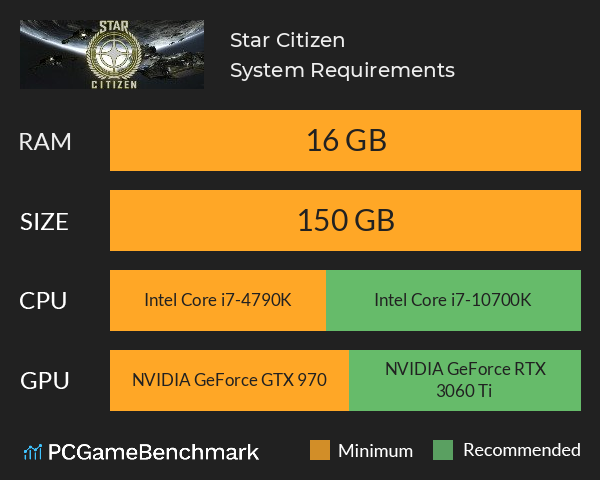
| CPU | Intel Core i7-4790K or Ryzen 5 1600 | Intel Core i7-10700K or Ryzen 7 2700X |
| Graphics Card | NVIDIA GeForce GTX 970 or Radeon RX 570 | NVIDIA GeForce RTX 3060 Ti or Radeon RX 6700 XT |
| RAM | 16 GB | 16 GB |
| File Size | 150 GB | 150 GB |
| OS | Windows 10 64-bit or higher | up to Windows 11 |
Can you run it? Test your computer against Star Citizen system requirements.
Can I Run Star Citizen?
To run the Star Citizen system requirements, you will need an NVIDIA GeForce GTX 970 GPU, an Intel Core i7-4790K processor, 16GB of RAM, and 150GB of SSD space.
Deep into development, Star Citizen is an online spacefaring exploration experience and, surprisingly, not that demanding of a game (if you don't look too hard at the RAM requirements). That said, while the Star Citizen PC requirements might be quite low, you'll need a really good internet connection on a Windows 10 or 11 PC if you want to get anywhere in the game anytime soon.
To meet the Star Citizen minimum requirements, you'll need a processor as powerful as an AMD Ryzen 5 1600 in addition to 16GB of RAM. On the GPU side, the AMD Radeon RX 570 should be powerful enough to get you going on your spacefaring adventure.
Moving up to the Star Citizen recommended system requirements, running the game on a CPU like the Intel Core i7 10700K or AMD Ryzen 7 2700X should help improve maximum and minimum frame rates. However, you'll be able to boost fps even further with graphics cards such as the NVIDIA GeForce RTX 3060 Ti or AMD Radeon RX 6700 XT.
Star Citizen size - How big is Star Citizen?
The Star Citizen download size on PCs and laptops sits at 150GB of SSD space. The developers, however, have pointed out that the download size could grow above 150GB, so you might want to reserve some extra space for the game as more and more updates are released.
So, if you need more space or want to make an upgrade, check the PCGamesN buyers guide for the best SSD for gaming or just check the latest, best prices for SSDs.
Star Citizen release date
There's still no sign of an actual Star Citizen release date, but the beta has been available since 2012. The lack of a launch window hasn't held back the game's popularity, however, as over the past decade it's become the most crowdfunded game in history.
Star Citizen Steam
There is currently no Star Citizen Steam version to download. For now, the only way to get into the game is to download it directly from its website and play it through its own launcher.
Star Citizen performance guide
Looking to improve your frame rate in Star Citizen? This is a pretty demanding game so try some of the following steps.
- Better Star Citizen performance has been found with V-Sync turned off.
- Deleting the shader folder found in the USER folder after an update can also fix issues. To do this go through the folders INSTALL FOLDER\StarCitizen\LIVE\USER and delete the “shaders” folder.
- Turning the “Chromatic Aberration” slider to 0 in the options also may affect performance positively and only a small aspect of visuals in taken away.
- Star Citizen will always be best on higher end hardware, but due to constant updates and not being officially released yet, requirements and overall performance is subject to change.
Star Citizen will run on PC system with Windows 10 64-bit or higher and upwards.
Looking for an upgrade? See our graphics card comparison and CPU compare for benchmarks. We'll help you find the best deal for the right gear to run the game.
Star Citizen FPS - what frame rate can you expect?
How many FPS will I get on Star Citizen? We reference thousands of reports from PCGameBenchmark users running our free tool on Overwolf to tell you exactly how Star Citizen performs across a range of different settings and resolutions on the most popular PC gaming setups.
What frame rate does Star Citizen run at?
Here are the typical frame rate samples
| Avg FPS | CPU | GPU | RAM |
| 60 | Intel Core i7-14700F | NVIDIA GeForce RTX 4080 SUPER | 32 GB |
| 38 | Intel Core i7-7700 | NVIDIA GeForce GTX 1060 3GB | 32 GB |
| 37 | Intel Core i7-8750H | NVIDIA GeForce GTX 1060 | 32 GB |
| 35 | Intel Core i9-7900X | NVIDIA GeForce GTX 1080 | 64 GB |
| 29 | Intel Core i5-8400 | NVIDIA GeForce RTX 3060 | 32 GB |
What frame rate does Star Citizen run at? Check our FPS Calculator
Are you experiencing Star Citizen FPS drops and stutters? Want to know exactly how the game performs on your system? You can get a free easy FPS test for all your games using the PCGameBenchmark FPS monitor tool - your first step to understanding how the parts in your gaming PC are actually performing in real-world conditions.
Star Citizen Details
| Download | Star Citizen Download |
| Categories | Action Simulation MMO |
| Star Citizen Release Date | Estimated 31st of Dec 2021 |
Imagine a universe that combines the freedom of exploration, the thrill of combat, and the unique challenge of building a life in space. Star Citizen puts ultimate control in the hands of the player, whether you're making your way as a cargo hauler, exploring the vastness of space, or scraping out a living outside the law, you will navigate through a mixture of procedurally generated and handcrafted worlds and interact with a variety of characters.