

The Elder Scrolls Online System Requirements
The Elder Scrolls Online System Requirements - full specs, system checker and the gaming PC setup you need.
| Minimum | Recommended | |
| CPU | Intel Core i3-540 | Intel Core i5-2300 |
| Graphics Card | AMD Radeon HD 6850 | NVIDIA GeForce GTX 750 |
| RAM | 3 GB | 8 GB |
| File Size | 85 GB | 85 GB |
| OS | Windows 7 64-bit |
Windows 7 64-bit |
Can you run it? Test your computer against The Elder Scrolls Online system requirements.
Can I Run The Elder Scrolls Online?
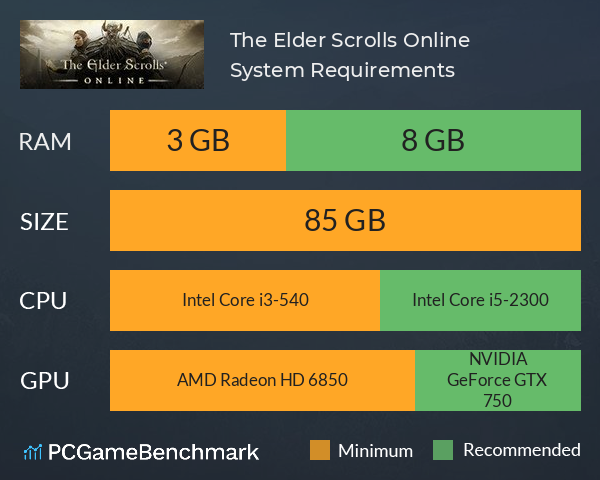
The Elder Scrolls Online system requirements include a minimum CPU equivalent to an Intel Core i3-540. The recommended CPU is equivalent to an Intel Core i5-2300. You will need at least 85 GB of free storage space. The ESO PC Specs state that the cheapest graphics card you can play it on is an AMD Radeon HD 6850, but the developers recommend a GPU equivalent to an NVIDIA GeForce GTX 750. The minimum memory requirement to hit the ESO system requirements is 3 GB of RAM, but 8 is recommended.
Elder Scrolls Online PC performance guide
If you are struggling with FPS with Elder Scrolls Online for PC, here are some tips.
- Turn down or disable shadows completely - this is the most demanding graphical option in the game.
- Keep water reflection quality on LOW
- Disable any background applications, for example Game DVR or GeForce Experience
- Ensure you are running the game in Fullscreen, not windowed.
Latest Bethesda title
If you're looking to take your Bethesda experience into space, see if you can run the Starfield system requirements.
The Elder Scrolls Online will run on PC system with Windows 7 64-bit
and upwards.
Additionally it has a Mac version.
Looking for an upgrade? See our graphics card comparison and CPU compare for benchmarks. We'll help you find the best deal for the right gear to run the game.
The Elder Scrolls Online FPS - what frame rate can you expect?
How many FPS will I get on The Elder Scrolls Online? An FPS Monitor is the first step in understanding how the parts in your gaming PC are actually performing in real-world conditions. It's the perfect way to track The Elder Scrolls Online FPS drops and stutters.
Download our free tool on Overwolf to count your frame rates as you play, and test how tweaks to your settings can boost FPS and increase The Elder Scrolls Online performance. Our app is compatible with hundreds of the best PC games and available now.
The Elder Scrolls Online Mac OS system requirements (minimum)
- Memory:4 GB
- Graphics Card:NVIDIA GeForce GTX 460
- CPU:Intel Core 2 Duo T7600
- File Size:85 GB
- OS:OS X 10.9
The Elder Scrolls Online Details

| Player Count | 8,087 Players (Last 24 Hours) |
| Download | Via Steam |
| Categories | Action RPG Adventure |
| The Elder Scrolls Online Release Date | 22nd of May 2017 |
| The Elder Scrolls Online PC price today | $19.99 |
Every legend starts somewhere and in The Elder Scrolls Online, it starts with you. Join millions of players in an online, fantasy RPG set in a vast living Elder Scrolls world.