

Battlefield 5 System Requirements
Battlefield 5 System Requirements - full specs, system checker and the gaming PC setup you need.
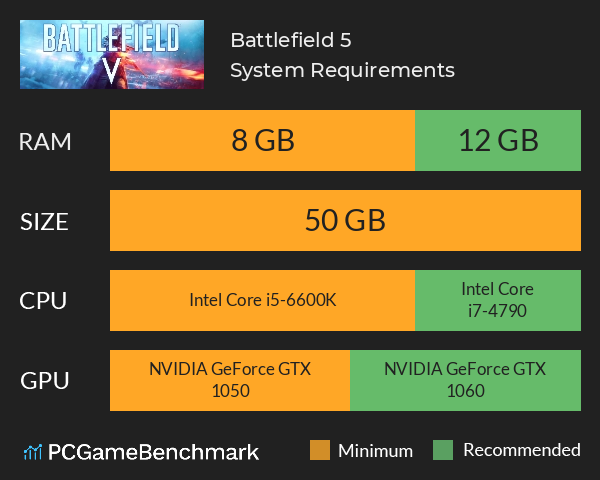
| Minimum | Recommended | |
| CPU | Intel Core i5-6600K | Intel Core i7-4790 |
| Graphics Card | NVIDIA GeForce GTX 1050 | NVIDIA GeForce GTX 1060 |
| RAM | 8 GB | 12 GB |
| File Size | 50 GB | 50 GB |
| OS | 64-bit Windows 7, Windows 8.1 and Windows 10 | 64-bit Windows 10 or later |
Can you run it? Test your computer against Battlefield 5 system requirements.
Can I Run Battlefield 5?
The Battlefield 5 system requirements ask for a minimum CPU equivalent to an Intel Core i5-6600K Whereas, an Intel Core i7-4790 or better is recommended for the best experience. Provided that you have at least an NVIDIA GeForce GTX 1050 graphics card or equivalent you can play the game. Furthermore, an NVIDIA GeForce GTX 1060 is recommended in order to run BF5 at its best. BF5 system requirements state that you will need at least 8 GB of RAM. Additionally, the game developers recommend 12 GB of RAM in your system. You will need at least 50 GB of free disk space to install Battlefield 5. The Battlefield V system requirements did not change for Battlefield 5 Armageddon.
Battlefield 5 Performance Guide
While the game does have a single player, let’s face it, most of us are here for the multiplayer. With that in mind, you want to make sure your system is able to run the game at a stable, high frame rate. If you drop precious frames at a crucial moment, it can mean the difference between a well-earned kill and a disappointing death. Thankfully there are various settings you can tweak to help make sure the game runs smoothly. Getting the best Battlefield V specs is not the only answer though - there are a few tweaks.
- Firstly, turn off DX12. In theory it might help the Battlefield 5 PC perform better in the future, but right now it can cause stuttering.
- Reducing the resolution scale by 10-20% will give a big boost in FPS without having too much of an impact on the visual quality.
- Turning down the effects quality, anti-aliasing, light quality and texture filtering can make small improvements to frame rate without making the game look too much worse.
- If you’re still struggling to keep things smooth, turn down texture quality, undergrowth quality, mesh quality and terrain quality. These settings will downgrade the graphics considerably, but should give significant boosts in frame rate. If your graphic card has less than 2GB VRAM, you can also turn on “GPU Memory Restriction” which will prevent the game from pushing your graphics card harder than it can manage.
Battlefield 5 Steam
EA recently brought over a significant number of their games onto Steam after previously only being available through their own Origin client. The game is also available as part of EA's subscription service, EA Play.
Check out the Battlefield 4 system requirements for something a little less demanding on your hardware.
Latest Battlefield game
For the latest Battlefield game, check our Battlefield 2042 requirements. For the most played game in the series (according to SteamDb), check out the Battlefield 5 requirements guide.
Battlefield 5 will run on PC system with 64-bit Windows 7, Windows 8.1 and Windows 10 and upwards.
Looking for an upgrade? See our graphics card comparison and CPU compare for benchmarks. We'll help you find the best deal for the right gear to run the game.
Battlefield 5 FPS - what frame rate can you expect?
How many FPS will I get on Battlefield 5? An FPS Monitor is the first step in understanding how the parts in your gaming PC are actually performing in real-world conditions. It's the perfect way to track Battlefield 5 FPS drops and stutters.
Download our free tool on Overwolf to count your frame rates as you play, and test how tweaks to your settings can boost FPS and increase Battlefield 5 performance. Our app is compatible with hundreds of the best PC games and available now.
Battlefield 5 Details
| Review Score | 81 / 100 |
| Battlefield 5 Release Date | 9th of November 2018 |
The Battlefield series goes back to its roots in a never-before-seen portrayal of World War 2. Take on all-out multiplayer with your squad in modes like the vast Grand Operations and the cooperative Combined Arms, or witness human drama set against global combat in the single-player War Stories. As you fight in epic, unexpected locations across the globe, enjoy the richest and most immersive Battlefield yet.