

DOOM Eternal System Requirements
DOOM Eternal System Requirements - full specs, system checker and the gaming PC setup you need.
| Minimum | Recommended | |
| CPU | Intel Core i5-661 | Intel Core i7-6700K |
| Graphics Card | AMD Radeon R9 280 | AMD Radeon RX 480 |
| RAM | 8 GB | 8 GB |
| File Size | 50 GB | 50 GB |
| OS | 64-bit Windows 7 / 64-Bit Windows 10 | 64-bit Windows 10 |
Can you run it? Test your computer against DOOM Eternal system requirements.
Can I Run DOOM Eternal?
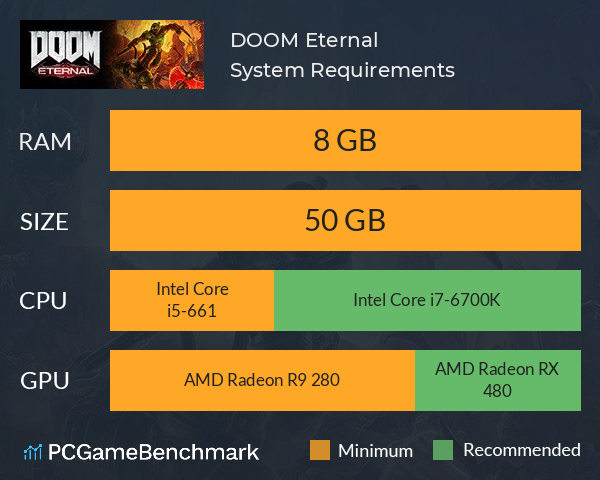
To run the DOOM Eternal system requirements, you will need an AMD Radeon R9 280 GPU, an Intel Core i5-661 CPU, 8GB of RAM, and 50GB of HD space.
An Intel Core i5-661 CPU is required at a minimum to run DOOM Eternal. Whereas, an Intel Core i7-6700K is recommended in order to run it. You will need at least 50GB of free disk space to install DOOM Eternal. DOOM Eternal system requirements state that you will need at least 8GB of RAM. The cheapest graphics card you can play it on is an AMD Radeon R9 280. Furthermore, an AMD Radeon RX 480 is recommended in order to run DOOM Eternal with the highest settings.
Doom Eternal PC is a relatively demanding game and will need a dedicated gaming PC to run it. It is not a PC game that will run easily on your old laptop or PC - the 2020 Doom is bang up to date. The developer id Software built Doom Eternal using the id Tech 7 engine. The new Doom 2020 minimum requirements compared to Doom 2016 (id Tech 6) have increased a little, so if you were only just meeting minimum requirements on that game you may struggle to play Doom Eternal.
The Doom Eternal frame rate can go up to 1000fps, allowing the game to take advantage of high-end hardware. Bethesda claims that the minimum specs will deliver 1080p / 60 FPS / Low Quality Settings and the recommended will offer 1080p / 60 FPS / High Quality Settings. They also say that on NVIDIA GTX 970 cards Texture Quality should be set to Medium.
DOOM Eternal size - How big is Doom Eternal?
The DOOM Eternal download size for PC sits at 50GB of HD space. So, if you need more space or want to make an upgrade, check the PCGamesN buyers guide for the best SSD for gaming.
DOOM Eternal performance guide
Some users have reported Doom Eternal FPS issues and stuttering Downloading the latest NVIDIA drivers or AMD drivers for your graphics card will ensure optimum performance. Disabling overlays such as Discord or Xbox Game Bar have been known to improve the game’s performance. Running the game on PCs below the minimum requirements will also cause these problems.
The game has a vast array of graphics settings, with a customisable field of view, many advanced graphics options, and a colour-blind mode. If you are trying to run the game on a lower end PC, the best Doom Eternal settings are to turn off anti aliasing to help boost performance.. Resolution scaling can also help if you are struggling to run the game at a higher resolution, for example 4K.
Latest DOOM game
Want to dive into the Doomslayer's next adventure? See if your PC can run the DOOM The Dark Ages requirements. Alternatively, try your hand at the original Doom system requirements from 2016.
DOOM Eternal will run on PC system with 64-bit Windows 7 / 64-Bit Windows 10 and upwards.
Looking for an upgrade? See our graphics card comparison and CPU compare for benchmarks. We'll help you find the best deal for the right gear to run the game.
DOOM Eternal FPS - what frame rate can you expect?
How many FPS will I get on DOOM Eternal? An FPS Monitor is the first step in understanding how the parts in your gaming PC are actually performing in real-world conditions. It's the perfect way to track DOOM Eternal FPS drops and stutters.
Download our free tool on Overwolf to count your frame rates as you play, and test how tweaks to your settings can boost FPS and increase DOOM Eternal performance. Our app is compatible with hundreds of the best PC games and available now.
DOOM Eternal Details
| Player Count | 574 Players (Last 24 Hours) |
| Review Score | 90 / 100 |
| Download | DOOM Eternal Download |
| Categories | Action FPS |
| DOOM Eternal Release Date | 19th of March 2020 |
| DOOM Eternal PC price today | $39.99 |
Hell’s armies have invaded Earth. Become the Slayer in an epic single-player campaign to conquer demons across dimensions and stop the final destruction of humanity. The only thing they fear... is you.