

Watch Dogs 2 System Requirements
Full Watch Dogs 2 System Requirements, with the Watch Dogs 2 minimum requirements and recommended specs.
| Minimum | Recommended | |
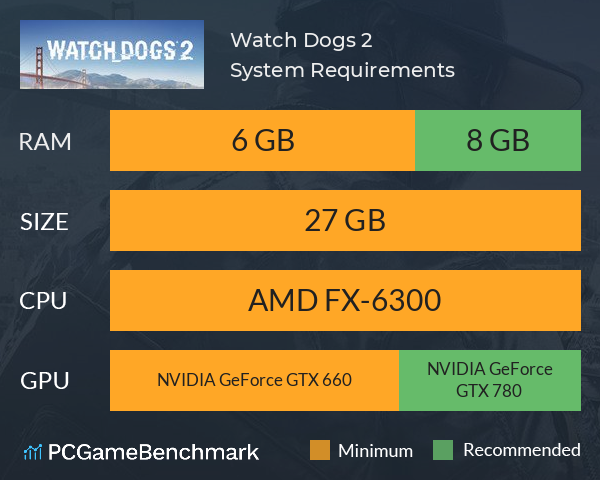
| CPU | AMD FX-6300 | AMD FX-8120 |
| Graphics Card | NVIDIA GeForce GTX 660 | NVIDIA GeForce GTX 780 |
| RAM | 6 GB | 8 GB |
| File Size | 27 GB | 27 GB |
| OS | Windows 7 SP1, Windows 8.1, Windows 10 (64bit versions only) | Windows 7 SP1, Windows 8.1, Windows 10 (64bit versions only) |
Can you run it? Test your computer against Watch Dogs 2 system requirements.
Can I Run Watch Dogs 2?
To run the Watch Dogs 2 system requirements, you will need an NVIDIA GeForce GTX 660 GPU, an AMD FX-6120 Six-Core CPU, 6GB of RAM, and 27GB of free space.
The Watch Dogs 2 system requirements will not hack your bank account! In terms of game file size, you will need at least 27GB of free disk space available. An AMD FX-6120 Six-Core CPU is required at a minimum to run the game, However the developers recommend a CPU greater or equal to an AMD FX-8120. The minimum RAM required by Ubisoft is 6GB, but 8GB is recommended. The minimum GPU you can play it on is equivalent to an NVIDIA GeForce GTX 660. However the Watch Dogs 2 PC requirements recommend a GPU equivalent to or better than an NVIDIA GeForce GTX 780.
Watch Dogs 2 size
The Watch Dogs 2 size for download on PC is 27GB of HD or SSD space.
So, if you need more space or want to make an upgrade, check the PCGamesN buyers guide for the best SSD for gaming.
Watch Dogs 2 Performance Guide
Watch Dogs 2 is a very CPU intensive game, so you may find your CPU actually bottle necking your graphics card. In addition Watch Dogs 2 is not the most best PC port. Here are some tips for improving performance.
- How can you tell if your CPU is causing a bottleneck? Press 'Ctrl + Shift + ESC', then look at the CPU usage over time after playing Watch Dogs 2. If this is hitting a high percentage but your GPU isn't, then you have a bottleneck.
- Despite the recommended GPU from Ubisoft being a GTX 780, NVIDIA stated that they recommend a GTX 1060 to have the best experience playing the game.
- The 'Extra Detail' setting is the most demanding in the game, which is not enabled by default in any of the graphics preset. At its highest setting, NVIDIA themselves measured a 24% drop in FPS. Try and keep away from this setting unless your PC can handle it.
- The 'Geometry' setting can also see performance gains when lowered, especially if you're trying to reduce a CPU bottleneck.
- Disable background applications such as Game DVR and GeForce Experience, or any other CPU intense applications.
Looking for the next Watch Dogs game? Check the Watch Dogs Legion system requirements. Or, if you're just looking for some more gangster action, try out the GTA 5 requirements on PC and laptop.
Watch Dogs 2 will run on PC system with Windows 7 SP1, Windows 8.1, Windows 10 (64bit versions only) and upwards.
Looking for an upgrade? See our graphics card comparison and CPU compare for benchmarks. We'll help you find the best deal for the right gear to run the game.
Watch Dogs 2 FPS - what frame rate can you expect?
How many FPS will I get on Watch Dogs 2? An FPS Monitor is the first step in understanding how the parts in your gaming PC are actually performing in real-world conditions. It's the perfect way to track Watch Dogs 2 FPS drops and stutters.
Download our free tool on Overwolf to count your frame rates as you play, and test how tweaks to your settings can boost FPS and increase Watch Dogs 2 performance. Our app is compatible with hundreds of the best PC games and available now.
Watch Dogs 2 Details
| Player Count | 1,417 Players (Last 24 Hours) |
| Review Score | 75 / 100 |
| Download | Click here to buy Watch Dogs 2 now |
| Categories | Action Adventure FPS |
| Watch Dogs 2 Release Date | 28th of November 2016 |
| Watch Dogs 2 PC price today | $49.99 |
Welcome to San Francisco. Play as Marcus, a brilliant young hacker, and join the most notorious hacker group, DedSec. Your objective: execute the biggest hack of history.