

Red Dead Online System Requirements
Red Dead Online System Requirements - full specs, system checker and the gaming PC setup you need.
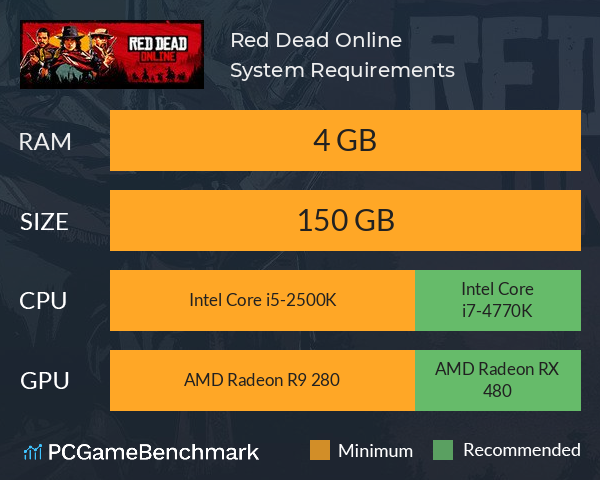
| Minimum | Recommended | |
| CPU | Intel Core i5-2500K | Intel Core i7-4770K |
| Graphics Card | AMD Radeon R9 280 | AMD Radeon RX 480 |
| RAM | 4 GB | 4 GB |
| File Size | 150 GB | 150 GB |
| OS | Windows 7 - Service Pack 1 (6.1.7601) | Windows 10 - April 2018 Update (v1803) |
Can you run it? Test your computer against Red Dead Online system requirements.

Can I Run Red Dead Online?
The Red Dead Online system requirements are identical to the Red Dead Redemption 2 system requirements. Provided you have a minimum graphics card equivalent to an AMD Radeon R9 280, you can play the game. Furthermore, an AMD Radeon RX 480 is recommended in order to run Red Dead Online with the highest settings. Red Dead Online PC requirements state that you will need at least 4GB of RAM. In terms of game file size, you will need at least 150 GB of free disk space available. An Intel Core i5-2500K CPU is required at a minimum to run Red Dead Online. However, the developers recommend a CPU greater or equal to an Intel Core i7-4770K to play the game.
Red Dead Online Performance Guide
Looking to improve your FPS in Red Dead Online? Try these steps. Firstly, we'd recommend turning down/off the following graphical options, as these have the biggest hit to performance:
- MSAA
- Grass Level of Detail
- Tree Tesselation
- Reflection Quality
- Water Quality
- Volumetrics Quality
- Shadow Quality
- Texture Quality
You may also want to try some of the following steps:
- Close resource-heavy background programs before running xxx - Open Task Manager (Ctrl + Shift + Esc) to see which programs are using the most resources.
- Run the game in fullscreen as opposed to windowed.
- Ensure you have the latest graphics cards drivers installed.
Want to play the original Red Dead game on PC? Check to see if you can meet the Red Dead Redemption PC requirements. Alternatively, head to the modern era of Rockstar games with the GTA 5 system requirements, and the latest game: the GTA 6 system requirements.
Red Dead Online will run on PC system with Windows 7 - Service Pack 1 (6.1.7601) and upwards.
Looking for an upgrade? See our graphics card comparison and CPU compare for benchmarks. We'll help you find the best deal for the right gear to run the game.
Red Dead Online FPS - what frame rate can you expect?
How many FPS will I get on Red Dead Online? An FPS Monitor is the first step in understanding how the parts in your gaming PC are actually performing in real-world conditions. It's the perfect way to track Red Dead Online FPS drops and stutters.
Download our free tool on Overwolf to count your frame rates as you play, and test how tweaks to your settings can boost FPS and increase Red Dead Online performance. Our app is compatible with hundreds of the best PC games and available now.
Red Dead Online Details
| Player Count | 1,947 Players (Last 24 Hours) |
| Review Score | 60 / 100 |
| Download | Red Dead Online Download |
| Categories | Action Adventure FPS |
| Red Dead Online Release Date | 1st of December 2020 |
| Red Dead Online PC price today | $9.99 50% saving |
Step into the vibrant, ever-evolving world of Red Dead Online and experience life in frontier America. Chase down bounties, battle outlaw gangs and other players, hunt, fish and trade, search for exotic treasures, run Moonshine, and much more to discover in a world of astounding depth and detail.